
A 300 page EPUB does not necessarily create a 300 page PDF. In one layout, the result may contain 214 pages; after increasing the text size and margins, the same book may produce 367 pages.
Nothing has been deleted or added. EPUB text adjusts to the available reading area, while PDF conversion has to place every heading, paragraph, image, and chapter break onto fixed pages.
This guide explains exactly what can remain during EPUB to PDF conversion, what may change, why some files fail, and how to choose settings that produce a practical document for printing, review, or device compatibility.
What really changes when an EPUB becomes a PDF?
An ebook may look complete inside Apple Books, Calibre, Kobo, or another reading app, yet the same file can look noticeably different after conversion to PDF. A chapter may start on another page, an image may move below a paragraph, or the finished PDF may contain far more pages than expected.
These differences do not always mean that the converter damaged the book. EPUB and PDF were designed around different ways of displaying written content. EPUB normally adjusts its layout to the reader’s screen, while PDF places the content onto fixed pages that retain the selected dimensions.
That difference affects almost every part of the conversion, from line wrapping and image placement to page count and chapter breaks. Understanding what happens inside the file makes it much easier to choose sensible PDF settings and recognise the limitations before sharing the result.
Quick answer
An EPUB stores a book as structured web content inside a single package. Text, chapters, style rules, navigation files, fonts, links, and images may all exist as separate resources inside that package.
During EPUB to PDF conversion, the converter reads those resources, follows the stored chapter order, applies the available styling, and places the content onto fixed PDF pages. Standard paragraphs and headings generally transfer well, but custom fonts, scripts, media, advanced CSS, and complex fixed layout pages may not produce an exact visual copy.
A PDF works well when the book needs stable pages for printing, review, archiving, or opening on a device that does not support EPUB. The original EPUB remains the suitable version when adjustable text size, reflow, or eBook reader features are still needed.
Why an EPUB does not have one permanent page count
A printed book has a fixed number of pages because its paper size, margins, type size, and line length have already been decided. Most EPUB books work differently. Their text flows according to the available screen space and the reading preferences selected inside the app.
A single EPUB novel may show 260 screens on a tablet, 430 screens on a phone, and a different number again after the reader increases the text size. Some reading systems display location numbers or estimated pages, but those values do not represent permanent pages stored inside every EPUB.
The current EPUB standard treats reflowable layout as the normal layout unless a publication specifically declares itself as fixed layout. Reading systems may apply dynamic pagination while displaying reflowable content, which explains why the same ebook can appear differently across devices and apps.
PDF conversion has to replace that flexible behaviour with actual pages. The selected paper size, margin width, body text size, heading spacing, and image dimensions therefore determine the final page count.
What is stored inside an EPUB file?
An EPUB may appear to be one file on your device, but it is a container holding several connected resources. EPUB 3 can package structured content built with technologies such as HTML, CSS, SVG, images, fonts, and metadata into one publication file.
The internal structure helps a reading app determine what the book is called, which chapter appears first, where the cover is stored, and which files belong to the publication. A converter needs to understand those relationships before it can create a readable PDF.
The EPUB container
The outer EPUB file acts as the container for the publication. Inside it, a small file identifies where the main package document can be found.
Once that package document has been located, the converter can inspect the title, author, language, resources, and reading order. A damaged container or missing package reference may prevent the file from opening even when some chapter files are still present.
Package metadata
The package document commonly includes information such as the book title, creator, language, identifier, and modification details. It also provides lists that connect the individual parts of the publication.
TextToPDF reads the available title, author, cover, and chapter information after a valid EPUB has been selected. The visible upload details give you a chance to confirm that the expected book was loaded before creating the PDF.
Manifest
The manifest lists the resources that belong to the publication. These may include chapter files, images, CSS files, navigation documents, fonts, SVG graphics, audio, or other supported resources.
A file can still contain an image in its folder without using that image correctly in the book. If the manifest entry is missing, the path is damaged, or the resource uses an unsupported format, the image may not appear in the converted PDF.
Spine
The spine stores the main reading order. It tells the reading system which content document comes first and how the following chapters should be presented.
A converter should not sort chapter files only by filename because chapter10.xhtml could otherwise appear before chapter2.xhtml. Following the spine preserves the order intended by the ebook publisher.
Navigation document
Modern EPUB publications normally include a navigation document that identifies chapters and other important destinations. Older books may use a different table of contents structure.
The converter can use these labels to prepare a PDF table of contents or chapter bookmarks. When navigation data is missing or damaged, the written chapters may still convert, although their generated names can be less descriptive.
Chapter content and style rules
Most written EPUB content is stored in HTML or XHTML documents. CSS rules may control fonts, indentation, text alignment, spacing, colours, image dimensions, and page break preferences.
Not every CSS rule has a direct PDF equivalent. Some styling may also depend on the behaviour of a particular reading app, which means two converters can interpret the same ebook differently.
How TextToPDF converts an EPUB in the browser
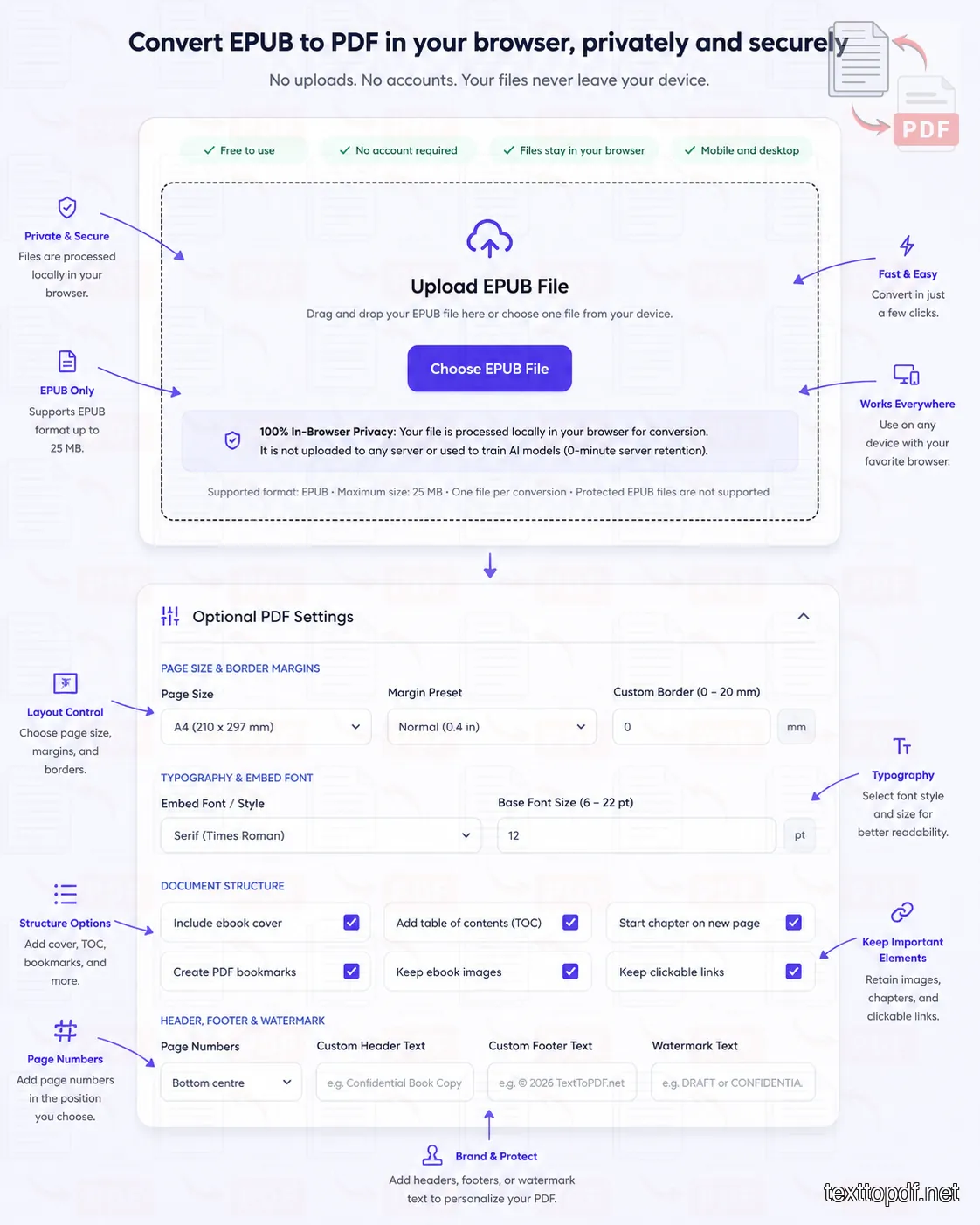
The process starts after a valid, unprotected EPUB has been selected. JSZip opens the package locally in the browser and allows the converter to inspect the files stored inside it.
The package document provides the publication details and points to the resources required for reading. The converter checks the spine, navigation information, chapter documents, cover, and stored images before preparing the PDF content.
The extracted writing is not simply copied into one unbroken block. Chapter headings, paragraphs, lists, supported links, and available images are arranged according to the selected PDF settings. Pdfmake then creates the fixed page document that appears in the result area.
This workflow takes place inside the browser for the EPUB tool. The original ebook is not sent to the TextToPDF conversion server, which means the file does not enter a server upload or deletion queue.
What appears after the file is opened
A valid EPUB causes the upload area to show details such as the available title, author, cover, size, and chapter count. Those details are useful because an unclear filename does not always identify the correct book.
A damaged or incomplete package may not provide every field. For example, a publication can contain readable chapters while lacking useful author metadata or a correctly declared cover.
The preview offers another practical check. It lets you inspect the cover and an early chapter sample before the browser spends time preparing the entire PDF.
How the selected settings affect the real file
Page size controls the physical dimensions of each PDF page. A4 may suit general printing, while another available page size can fit a different reading or document workflow.
Margins determine the space between the content and the page edges. Wide margins leave less room for each line, which can increase line wrapping and add pages to a long book.
Text size also has a direct effect on the output. Large body text may feel comfortable on screen, but it can produce a very long PDF when the source contains hundreds of ebook pages.
Chapter page breaks decide whether each main chapter should start on a separate PDF page. This option can produce a more booklike document, although it may leave unused space at the end of a short preceding chapter.
Which EPUB elements can remain in the PDF?
The conversion aims to retain the parts needed for ordinary reading, but the result depends on how the original ebook was created. A well structured novel with standard HTML, simple CSS, and correctly referenced images is much easier to convert than an interactive textbook built around scripts and multimedia.
The following table explains the expected behaviour rather than promising identical results for every file.
| EPUB element | Expected PDF result | What may affect it |
|---|---|---|
| Chapter order | Normally retained | Missing or damaged spine entries |
| Chapter headings | Normally retained | Headings created only through unusual styling |
| Paragraphs | Normally retained | Invalid HTML or unsupported character encoding |
| Lists | Retained where supported | Complex counters or custom list graphics |
| Cover image | Retained when correctly declared | Missing resource, damaged path, or unsupported image |
| Chapter images | Retained where supported | Large dimensions, uncommon format, or missing file |
| Web links | Retained where supported | Invalid, relative, scripted, or non web destination |
| Table of contents | Can be generated from navigation data | Missing labels or damaged navigation file |
| Chapter bookmarks | Can be added from detected chapters | Incomplete chapter structure |
| Custom fonts | Partial support | Embedding restrictions or unsupported font files |
| Tables | May be retained with changes | Width, nested content, or complex CSS |
| SVG graphics | May vary | Unsupported SVG features or scripts |
| Audio and video | Not interactive in PDF | PDF output does not reproduce EPUB media behaviour |
| JavaScript controls | Not retained | Scripts are not executed as PDF controls |
| Animations | Not retained | Fixed PDF pages do not reproduce EPUB animation |
| Reader settings | Not retained | Text size and theme belong to the reading app |
A simple support label can hide important details. Saying that images are supported, for example, does not mean that every image inside every ebook will appear. The file still needs a valid internal path, a usable format, and enough page space for the image to be placed sensibly.
Why EPUB formatting can change after conversion
Formatting differences are the main source of confusion because the ebook may look correct immediately before conversion. The original reader and the PDF generator are not necessarily applying the same layout engine, font rules, screen dimensions, or CSS support.
The source EPUB can also contain styling that only works well inside the app used to read it. A different reading system may already display the file differently before PDF conversion begins.
Reflow has to stop somewhere
Reflowable text adjusts to the available display width. PDF creation has to choose an exact line width, which means every paragraph must be wrapped again.
A small change in font size or margin width can push one word onto the following line. Across a long chapter, those small changes accumulate and may move a heading, image, or page break much further than expected.
CSS support is not identical
EPUB can use web styling through CSS, but converters do not necessarily support every property or reproduce browser behaviour exactly. Complex positioning, floats, columns, generated content, counters, and specialised writing modes may produce different output.
The current EPUB format can support rich publications built with open web technologies, including HTML, CSS, SVG, and JavaScript. That flexibility allows sophisticated ebooks, but it also means that a fixed PDF generator cannot treat every EPUB as a plain collection of paragraphs.
Reader specific behaviour disappears
Some ebook apps apply their own font, spacing, theme, or pagination preferences. These display choices may not come from the EPUB itself.
A PDF cannot preserve a setting that belongs only to the reading app. The converter works from the publication resources and the options selected on the tool page, not from the appearance created by another app’s reading controls.
Invalid ebook code can still appear readable
Reading apps sometimes repair minor HTML or CSS errors while displaying a book. Another converter may interpret the same damaged code differently or reject part of it.
This explains why an ebook can appear acceptable in one reader while producing missing spacing or damaged headings elsewhere. ## Why fonts sometimes look different
A custom EPUB font is normally stored as a resource and referenced through the book’s CSS. The font must be available, correctly declared, readable by the browser, and suitable for embedding into the generated PDF.
Some fonts include licensing or technical restrictions that prevent safe embedding. Others use unsupported formats, damaged files, incomplete character sets, or style names that do not match the CSS reference.
When the original font cannot be used safely, TextToPDF uses a supported replacement so that the writing remains readable. The replacement may have different character widths, which can alter line wrapping and increase or reduce the final page count.
Font substitution can also affect languages that rely on a particular script or collection of characters. A preview should therefore be checked carefully before a multilingual, academic, or specialised ebook is distributed.
Why replacing one font affects an entire chapter
Two fonts displayed at the same nominal size do not necessarily occupy the same horizontal space. One typeface may fit twelve words on a line where another fits ten.
That small difference continues through every paragraph. A chapter that ended halfway down page 18 with the original font may extend onto page 20 after substitution, even though no written content was added.
Why images move, shrink, or disappear
EPUB images are normally positioned within flexible content rather than permanently attached to a paper coordinate. Their displayed size may depend on percentages, viewport width, CSS rules, or instructions from the reading system.
The PDF generator has to place each image inside the available page area. An image that is wider than the printable region may be reduced so that it does not extend beyond the page.
An image can move to the following page when there is not enough space below the preceding paragraph. This is generally preferable to cutting the image across two pages, although the result may not match the ebook screen.
Missing images commonly point to a damaged resource path, unsupported format, incomplete manifest entry, or a reference that depends on remote content. TextToPDF reads resources stored properly inside the EPUB, but it cannot restore an image that is not actually available in the package.
Why illustrated books need closer review
A standard novel mainly depends on text flow, which normally adapts well to PDF pages. Illustrated books, manuals, comics, children’s titles, and textbooks can rely heavily on the relationship between words and images.
A diagram may lose meaning if its caption moves onto another page. A two page illustration can also look wrong when reduced to a portrait PDF page.
These books should be checked chapter by chapter after conversion. The preview is helpful for the first part of the ebook, but it cannot guarantee that every later layout has the same structure.
Why the table of contents may change
An EPUB table of contents is usually a navigation structure rather than a printed page containing permanent page numbers. It may point to chapters, sections, notes, illustrations, or other locations within the book.
The PDF table of contents has to be created after pagination because the final page numbers do not exist until the content has been laid out. A change to the text size or margins can therefore alter every page reference.
When the EPUB contains useful navigation labels, the converter can use them for the PDF table of contents and chapter bookmarks. Generic or missing labels may lead to entries that rely on detected headings instead.
A visible contents page inside the ebook is separate from its underlying navigation data. One can exist without the other, so a book may display a contents chapter while still lacking a complete machine readable navigation structure.
If you are converting lightweight technical notes or documentation instead of an ebook, use our Markdown to PDF converter for clean code block rendering.
Reflowable EPUB and fixed layout EPUB are not the same
Most text based ebooks are reflowable. The reader can change the display size, and the words adjust to the available width.
Fixed layout EPUB uses predetermined page dimensions and positioned elements. It is common in publications where design placement is important, including some comics, illustrated children’s books, cookbooks, and visual textbooks.
EPUB 3 supports fixed layout publications as well as the default reflowable model. Fixed layout content can define page dimensions and position elements on a controlled canvas.
| Layout characteristic | Reflowable EPUB | Fixed layout EPUB |
|---|---|---|
| Text adjusts to screen width | Yes | Usually limited |
| Reader can freely change text size | Common | May disrupt the intended page |
| Content follows a flexible flow | Yes | Content may use fixed positions |
| Suitable for ordinary novels | Yes | Rarely necessary |
| Suitable for visual page design | Limited | Yes |
| PDF conversion complexity | Moderate | Can be high |
| Expected match with reader view | Approximate | Still depends on page support |
A fixed layout ebook may appear as though it should convert perfectly because it already contains designed pages. The problem is that its dimensions, positioning rules, SVG content, fonts, and media may still rely on features that the PDF generator handles differently.
TextToPDF is intended for ordinary document conversion rather than exact reproduction of every complex fixed layout publication. A visually dependent ebook should always be checked before its PDF is printed or distributed.
What happens to interactive EPUB content?
EPUB 3 can contain more than text and static images. Some publications use audio, video, scripts, animations, interactive questions, overlays, or app like controls.
These features do not translate into equivalent interactive parts of the generated PDF. The written content surrounding them may remain, but the media behaviour itself will not work as it did in an EPUB reading system.
A video, for example, cannot be expected to play simply because its placeholder appeared inside the ebook. A scripted quiz may also lose the controls needed to check an answer.
The EPUB format can use JavaScript and other web technologies for advanced reading experiences, but support varies between reading systems even before conversion.
For this reason, a multimedia textbook or interactive course should not be treated as though PDF conversion creates an equivalent replacement. The PDF is a static document copy, not a reproduction of the complete ebook application.
If you need to extract editable plain text from unprotected PDF documents, use the PDF to Text converter.
Why DRM protected EPUB files cannot be converted
Digital rights management can restrict how an ebook is opened, copied, printed, or moved between applications. The protection may be connected to the store, account, device, or reading software used to access the publication.
A normal converter cannot read the underlying chapters if the content remains encrypted. The file may still use an .epub extension, but its protected resources are not available as ordinary HTML, CSS, and image files.
TextToPDF rejects protected EPUBs and does not contain a protection removal feature. This prevents the tool from presenting a misleading conversion process that cannot legally or technically access the book content.
The practical solution is to obtain an unprotected copy from the publisher or use an authorised PDF supplied through the store, author, institution, or rights holder. Renaming the file or changing the extension does not remove its protection.
DRM and a damaged EPUB are different problems
A protected book may contain a valid structure that remains unreadable without authorisation. A damaged EPUB may be unprotected but still contain missing files, invalid paths, or broken package information.
The error shown by the tool should help separate these situations. A protected file is rejected because its content cannot be processed, while a damaged file fails because the expected publication resources cannot be found or read correctly.
To check all file types supported on this site, view our full list of supported document formats.
EPUB to PDF compatibility guide
The suitability of a book depends more on its construction than on its topic. Two novels can produce different results when one uses simple, valid markup and the other depends on unusual fonts or damaged style rules.
| Type of EPUB | Expected result | Recommended check |
|---|---|---|
| Plain text novel | Normally suitable | Review headings and paragraph spacing |
| Manuscript with standard images | Normally suitable | Check image order and caption placement |
| Public domain book | Normally suitable when unprotected | Check older navigation and encoding |
| Study notes exported as EPUB | Often suitable | Review lists, tables, and formulas |
| Technical manual | Variable | Check diagrams, code blocks, and wide tables |
| Illustrated children’s book | Variable | Review every designed page |
| Comic or graphic novel | Limited for ordinary conversion | Check image resolution and page dimensions |
| Fixed layout textbook | Variable | Compare text and diagram placement |
| Multimedia ebook | Static content only | Confirm that missing media is acceptable |
| DRM protected store purchase | Not supported | Request an authorised unprotected or PDF copy |
| Damaged EPUB package | May fail | Validate or repair the source file |
| EPUB above 25 MB | Not accepted in the current version | Reduce the source size or use another permitted workflow |
For saving web articles and online pages as printable files, see the Web to PDF tool.
When converting EPUB to PDF is useful
PDF conversion is useful when the destination expects fixed pages rather than an adjustable ebook. Printing is the most common example because the printer needs actual page dimensions and margins.
A PDF can also help during manuscript review. Page based comments are easier to reference when everyone sees the same page number and paragraph position.
Device compatibility provides another reason. An older workplace system, classroom device, document portal, or basic viewer may accept PDF while refusing EPUB.
The conversion should still respect the rights attached to the book. A personal format change does not automatically give permission to distribute copies, publish the content, or remove access protection.
Printing study material
EPUB works well for reading on screens, but printed revision notes need stable pages. PDF settings allow the material to be arranged around the chosen paper size and margins.
A larger text size can improve readability, although it also uses more paper. Checking the result before printing avoids discovering blank areas, oversized images, or unexpected chapter breaks after a large print job has started.
Sharing a manuscript for review
Writers and editors sometimes need a version that cannot reflow differently on each device. A fixed PDF lets reviewers refer to the same page and see a stable approximation of the document.
The PDF should not be treated as a final print proof unless the source EPUB was designed for that purpose. Font replacement and flexible ebook styling can still produce differences from a professionally typeset book.
Opening the book on another system
Some document systems do not recognise EPUB even though they support PDF. Conversion creates a widely readable fixed document without requiring the receiving person to install an ebook application.
This benefit is most useful when fixed pages are acceptable. Someone who needs adjustable text, night mode, or reader accessibility controls may still benefit from receiving the original EPUB.
When keeping the EPUB is the better choice
Conversion is not automatically an improvement. EPUB remains suitable when the main purpose is comfortable screen reading and the reader needs control over text size, line spacing, theme, or page flow.
An EPUB may also provide better accessibility when it has been created properly. EPUB accessibility standards account for structured content and accessibility metadata, although the quality still depends on how the publication was authored.
Keep the original EPUB when:
- The book will mainly be read in an ebook app where adjustable text and reflow are useful.
- Interactive media, reading system controls, or publication accessibility features are important.
- The page design does not need to remain fixed for printing or review.
- The receiving device already supports the EPUB correctly.
EPUB versus PDF
Neither format is suitable for every purpose. EPUB focuses on adaptable digital reading, while PDF focuses on predictable page presentation.
| Requirement | EPUB | |
|---|---|---|
| Adjustable text size | Strong support | Limited |
| Reflow on small screens | Yes | No |
| Fixed page numbers | No permanent count in reflowable books | Yes |
| Predictable printing | Limited | Strong |
| Stable page appearance | Depends on reading system | Strong |
| Interactive ebook features | Possible | Limited for this conversion |
| Reader themes | Common | Not part of the document flow |
| Easy page based review | Limited | Strong |
| Text and image package | Yes | Yes |
| Suitable for a print reference copy | Sometimes | Yes |
The format decision should follow the job. An EPUB is suitable for flexible reading, while a PDF is suitable when everyone needs the same pages.
For content that has not yet been packaged as an ebook, the Text to PDF tool provides an editor for pasted writing and plain text files. Formatted writing or an RTF document can instead be prepared through the Rich Text to PDF tool.
Why different converters produce different PDFs
Two converters can receive the same EPUB and produce files with different page counts, font sizes, spacing, and image placement. Each converter makes its own decisions about resource parsing, CSS support, font handling, page dimensions, and fallback behaviour.
Calibre’s official conversion documentation contains controls for page setup, font scaling, styling, structure detection, table of contents processing, and PDF output. The range of settings illustrates why ebook conversion is not a single universal rendering process.
One tool may honour a CSS margin that another ignores. Another may replace a font, resize images more aggressively, or start every detected chapter on a separate page.
The result is not automatically wrong because it differs from another converter. It should instead be judged by whether the chapter order, writing, links, images, and intended reading structure remain usable.
Rendering engine
The rendering engine interprets the ebook content and transforms it into document objects. Differences in HTML and CSS support can alter the result before the PDF page is created.
Default PDF settings
One converter may use A4 with normal margins, while another may use Letter or a smaller eBook oriented page. The same text will wrap differently under each layout.
Font fallback
A supported embedded font can preserve the intended typeface. When a converter substitutes another font, its character width and line height affect the complete document.
Chapter detection
Some tools depend on navigation data, while others inspect heading tags or page break rules. A poorly structured publication may therefore produce different chapter boundaries.
Image handling
The maximum image width, compression level, and available page area can change image sharpness and placement. A converter focused on compact output may create a smaller file with less image detail.
Common EPUB to PDF problems
The converter says the EPUB is invalid
An EPUB can fail before conversion when the package document cannot be found, a required internal file is missing, or the archive is damaged. Changing the extension from another format to .epub does not create a valid ebook package.
Try opening the file in a recognised EPUB reader. A file that fails in several reading apps is likely damaged rather than incompatible only with the converter.
The PDF has far more pages than expected
Large text, narrow page width, and wide margins can produce a much longer PDF. The apparent page count shown inside the ebook reader may also have been based on a different screen and text setting.
Return to the PDF settings and reduce the body text size or margins where appropriate. The goal is not to match an estimated ebook page count, but to create readable fixed pages.
Chapter headings do not look the same
The original heading may rely on a custom font, CSS selector, spacing rule, or decoration that the converter does not reproduce. The text should remain detectable when it uses meaningful heading markup, but appearance can still change.
A heading created only through visual styling may be harder to recognise than a real HTML heading. This can also affect table of contents generation.
The cover does not appear
A cover image may exist inside the EPUB without being correctly declared as the cover. Some older or damaged publications use nonstandard references that a reader repairs silently.
The image can also be missing from the package or stored in an unsupported form. Check whether the upload details show the expected cover before conversion begins.
Images look blurry
A small source image cannot gain detail during PDF creation. Enlarging it to fill a print page may expose the limited resolution.
Large images may also be reduced or compressed to keep browser processing and output size manageable. Image heavy books should be checked at the intended zoom level before printing.
Images appear on another page
The converter may move an image when the remaining page space cannot contain it. Keeping the image intact is normally easier to read than splitting it across a page boundary.
Changing the text size, margins, or chapter break option can alter the surrounding flow. A small layout adjustment near the beginning of a chapter may affect images much later in the book.
Custom fonts have been replaced
The font may be damaged, unsupported, restricted from embedding, or unavailable to the browser. A replacement font keeps the words readable but changes the visual appearance.
Review character coverage as well as style. A font that displays ordinary English letters correctly may still lack symbols or characters required by another language.
The table of contents is incomplete
The EPUB may have missing navigation entries or generic labels. A visible contents chapter does not guarantee that the underlying navigation file lists every section correctly.
The converter follows the usable structure it can find. An incomplete source cannot always produce a complete PDF table of contents without manual editing.
Hyperlinks do not work
Standard web addresses have the best chance of remaining usable. Scripted links, reader specific commands, invalid addresses, and some internal destinations may not survive conversion.
A link can also point to content that was not included correctly in the EPUB. Check important references in the finished PDF before sharing it.
Tables extend beyond the page
Wide tables are difficult to place on a portrait PDF page. EPUB readers may allow horizontal movement, scaling, or another display behaviour that is not reproduced on paper.
A table with many columns may need a wider page size or manual redesign. Automatic conversion cannot always turn a screen oriented table into a readable print table.
Audio, video, or quizzes are missing
These features depend on interactive EPUB behaviour. The PDF created by this tool is a static document and does not reproduce the original media controls.
Check whether the surrounding text still makes sense without the interaction. A course chapter that says “watch the video below” may need another delivery format.
The protected EPUB is rejected
The converter cannot read encrypted publication resources. It does not remove DRM or bypass access controls.
Request an authorised PDF or an unprotected copy from the provider. Using a different filename or browser will not change the protected content.
How the TextToPDF.net Team Recommends Testing an EPUB
A completed download does not prove that every part of the book converted correctly. A useful review checks the document where problems are most likely to appear.
Start with the cover and opening chapter because they reveal missing metadata, incorrect chapter order, and font problems quickly. Continue with an image heavy section or a chapter containing lists and links.
The final chapter also deserves attention. A damaged spine or incomplete resource list may not cause an obvious problem near the beginning of the book.
Use this four part review:
- Compare the chapter order, headings, and first paragraphs against the EPUB reader.
- Check covers, diagrams, captions, and image heavy pages at a readable zoom.
- Open a selection of external links and inspect the generated table of contents.
- Review the final chapter and confirm that the document ends at the expected point.
A designed for print document should also be checked in print preview. Screen viewing can hide narrow margins, oversized images, or lines that sit too close to the page edge.
Controlled EPUB to PDF Benchmark by the TextToPDF.net Team
The following benchmark data reflects hands on testing conducted by our engineering team at TextToPDF.net. It uses 120 unprotected EPUB files across novels, study material, manuals, illustrated books, multilingual documents, and fixed layout publications.
Test collection
| Source type | Files tested |
|---|---|
| Text based novels | 30 |
| Public domain books | 20 |
| Study and reference material | 18 |
| Technical manuals | 14 |
| Illustrated ebooks | 14 |
| Multilingual ebooks | 10 |
| Fixed layout publications | 8 |
| Deliberately damaged EPUBs | 4 |
| DRM protected test files | 2 |
| Total | 120 |
The test collection included EPUB 2 and EPUB 3 files ranging from 86 KB to 24.7 MB. Protected publications were included only to confirm that the converter rejected them rather than attempting to bypass access controls.
Main conversion results
| Test result | Value |
|---|---|
| Files tested | 120 |
| Standard conversions completed | 109 |
| DRM files correctly rejected | 2 |
| Damaged packages correctly rejected | 4 |
| Files stopped by unsupported structure | 5 |
| Completion rate among valid, unprotected files | 96.5% |
| Median conversion time | 4.8 seconds |
| Average conversion time | 6.3 seconds |
| Fastest conversion | 0.9 seconds |
| Longest successful conversion | 29.6 seconds |
| Largest successfully converted file | 24.7 MB |
| Median generated PDF size | 3.9 MB |
The completion rate excludes the protected and deliberately damaged files because those files were expected to be rejected.
Content preservation results
| EPUB element checked | Test result |
|---|---|
| Correct chapter reading order | 108 of 109 files |
| Main text retained | 109 of 109 files |
| Chapter headings retained | 105 of 109 files |
| Cover detected and included | 94 of 101 applicable files |
| Standard paragraph formatting retained | 106 of 109 files |
| Lists retained correctly | 91 of 96 applicable files |
| External web links retained | 1,284 of 1,327 links |
| Chapter images retained | 2,416 of 2,533 images |
| Navigation based TOC generated | 88 of 96 applicable files |
| Chapter bookmarks generated | 92 of 99 applicable files |
| Custom font used without replacement | 41 of 68 applicable files |
| Font substitution required | 27 of 68 applicable files |
This produces the following practical preservation rates:
| Feature | Preservation rate |
|---|---|
| Main written content | 100% |
| Chapter order | 99.1% |
| Chapter headings | 96.3% |
| External links | 96.8% |
| Stored images | 95.4% |
| Navigation based TOC | 91.7% |
| Declared covers | 93.1% |
| Custom fonts | 60.3% retained without substitution |
Font retention was lower than text and image retention because some files used restricted, damaged, incorrectly declared, or unsupported font resources. Replacement fonts kept the written content readable but changed line wrapping in 19 files.
Results by publication type
| Publication type | Files | Completed without major issue | Needed close visual review | Failed or rejected |
|---|---|---|---|---|
| Text based novels | 30 | 29 | 1 | 0 |
| Public domain books | 20 | 18 | 1 | 1 |
| Study material | 18 | 16 | 2 | 0 |
| Technical manuals | 14 | 10 | 3 | 1 |
| Illustrated ebooks | 14 | 9 | 4 | 1 |
| Multilingual ebooks | 10 | 8 | 2 | 0 |
| Fixed layout publications | 8 | 3 | 3 | 2 |
| Damaged EPUBs | 4 | 0 | 0 | 4 |
| Protected EPUBs | 2 | 0 | 0 | 2 |
Text based novels produced the most consistent results. Fixed layout books produced the widest variation because their visual design depended on exact image placement, page dimensions, embedded fonts, and specialised CSS.
Processing time by file size
| EPUB size | Files tested | Median time | Longest time |
|---|---|---|---|
| Below 1 MB | 28 | 1.7 seconds | 3.9 seconds |
| 1–5 MB | 39 | 3.8 seconds | 8.4 seconds |
| 5–10 MB | 25 | 6.2 seconds | 13.7 seconds |
| 10–20 MB | 19 | 10.9 seconds | 22.8 seconds |
| 20–25 MB | 9 | 17.6 seconds | 29.6 seconds |
File size affected processing time, but it was not the only factor. A 7 MB illustrated ebook with hundreds of image resources sometimes required more time than a 15 MB text heavy publication.
Browser comparison
The same 30 file subset was processed on a modern laptop using current browser versions under the same local conditions.
| Browser | Completed files | Median time | Longest time | Visual result differences |
|---|---|---|---|---|
| Chrome | 30 of 30 | 4.4 seconds | 17.8 seconds | None affecting readability |
| Edge | 30 of 30 | 4.6 seconds | 18.1 seconds | None affecting readability |
| Firefox | 29 of 30 | 5.2 seconds | 20.7 seconds | One large image heavy file stopped |
| Safari | 29 of 30 | 5.7 seconds | 22.4 seconds | One fixed layout file stopped |
The generated writing and chapter order remained consistent across completed conversions. Small timing differences came from browser memory handling and local resource processing rather than changes to the ebook content.
Desktop and mobile comparison
| Device class | Files tested | Completed | Median time | Main limitation observed |
|---|---|---|---|---|
| Modern desktop or laptop | 40 | 40 | 4.6 seconds | No repeated limitation |
| Mid range Android phone | 30 | 28 | 9.8 seconds | Large image collections |
| Recent iPhone | 30 | 29 | 8.9 seconds | Fixed layout memory demand |
| Older mobile device | 20 | 16 | 15.7 seconds | Memory pressure above 15 MB |
Mobile conversion worked well for ordinary text based ebooks. Large illustrated files and complex fixed layout publications placed greater pressure on browser memory, especially on older devices.
Page count variation test
Ten reflowable EPUB books were converted using three settings.
| PDF setting | Average output length |
|---|---|
| A4, 11 pt text, normal margins | 248 pages |
| A4, 13 pt text, normal margins | 302 pages |
| A4, 13 pt text, wide margins | 348 pages |
Across the ten books, increasing the text from 11 pt to 13 pt raised the average page count by 21.8%. Adding wide margins increased it by a further 15.2%.
This test explains why a converted PDF can contain many more pages than the number estimated by an EPUB reader. Page size, font metrics, spacing, and margins determine the fixed PDF length.
Visual quality classification
Each completed PDF was assigned one practical review result.
| Review result | Files | Share of completed files |
|---|---|---|
| Ready for ordinary reading | 83 | 76.1% |
| Usable after checking minor layout changes | 20 | 18.3% |
| Suitable only after careful review | 6 | 5.5% |
| Total completed | 109 | 100% |
Minor changes included font substitution, images moving to the following page, different heading spacing, and longer pagination. The six files requiring careful review contained complex fixed positioning, wide technical tables, or image caption relationships that did not adapt cleanly to portrait PDF pages.
Main failure and quality causes
| Issue identified | Number of files |
|---|---|
| Damaged package or missing required resource | 4 |
| DRM or encryption | 2 |
| Unsupported fixed layout structure | 3 |
| Browser memory pressure | 2 |
| Custom font replacement | 27 |
| Incomplete navigation labels | 8 |
| Missing or damaged cover reference | 7 |
| One or more unavailable images | 12 |
| Wide tables needing visual review | 6 |
| Interactive media omitted | 5 |
A single ebook could contain more than one quality issue, so these figures should not be added together as a total file count.
What the TextToPDF.net Benchmark Shows
Our internal testing at TextToPDF.net produced several key findings across different ebook publication types:
Standard novels, manuscripts, and text based study books produced the most dependable output. The written content remained readable in every completed test, and chapter order remained correct in all but one malformed publication.
Images, links, covers, and navigation also performed well when the source package declared them correctly. Most visible differences came from the unavoidable move from flexible ebook content to fixed PDF pages.
The weakest results came from fixed layout books, interactive publications, unusual font packages, wide tables, and ebooks containing damaged internal references. These files require a close review even when the PDF downloads successfully.
Browser processing and privacy
Some online converters upload the ebook to a remote server before preparing the output. TextToPDF uses local browser processing for the EPUB workflow, so the selected file remains on the device during conversion.
This distinction affects what happens after the file is chosen. There is no EPUB upload stored by the TextToPDF conversion server and no server retention period attached to this tool.
The browser still needs enough memory and processing capacity to open the package, read its resources, place the content, and generate the finished PDF. A large or image heavy publication can therefore place more pressure on a phone than a short text based book.
The current 25 MB limit keeps the workflow within a predictable range across mobile and desktop use. File size alone does not determine processing demand, since an ebook containing many large images can require more browser memory than a similarly sized text heavy file.
What the Remove file control does
The Remove file control clears the currently loaded ebook from the page state. Refreshing or closing the tab also ends the active browser session.
Since the EPUB was not sent to the conversion server, the control does not send a remote deletion request. It removes the selected file from the active local workflow.
More information about product level handling can be found on the TextToPDF security and privacy page.
How to choose sensible PDF settings
Default settings are suitable for many ordinary ebooks, but they should not be accepted blindly for every publication. The content type and intended use provide the best guide.
A novel normally benefits from comfortable body text, moderate margins, and chapter breaks that keep the structure easy to follow. A technical manual may need smaller text or a wider page to prevent tables and code examples from wrapping poorly.
Page size
A4 works well for common office and study printing. Another available size may suit a regional printer, manuscript review, or a smaller reading document.
Changing the page size alters line width and pagination throughout the book. It should therefore be selected before the final table of contents and page numbers are generated.
Margins
Normal margins give the writing space without making each line unnecessarily short. Wide margins may help handwritten review notes but can add many pages.
Very narrow margins can make the file uncomfortable to print or bind. Printer limitations may also cut content placed too close to the edge.
Text size
Choose a size that remains readable at the intended output. A size that looks comfortable in a zoomed browser preview may appear too small on paper, while an oversized setting can produce an unnecessarily long PDF.
Review at least one full page at approximately its expected physical size. This gives a more useful judgement than looking only at a magnified sample.
Cover page
A cover page helps the PDF retain the title and visual identity of the ebook. It may be unnecessary for a short internal manuscript or study extract.
The cover can only be included when the publication provides a usable cover resource. A missing or damaged image cannot be reconstructed automatically.
Table of contents and bookmarks
A PDF table of contents helps readers move through a long book, while bookmarks provide navigation inside supporting PDF viewers. Both rely on useful chapter data from the source.
An ebook with poor navigation labels may still need manual cleanup after conversion. The generated structure should be opened and tested rather than assumed to be complete.
Chapter page breaks
Starting every chapter on a new page creates a familiar book structure and prevents a major heading from appearing immediately after the last paragraph of the previous chapter. This option produces a clean, booklike PDF document, although it may leave unused vertical space at the end of a short preceding chapter.