
Markdown is easy to write, easy to scan, easy to revise, and easy to keep organized while you are doing your coding and official works espeically in the era of AI.
But the problem generally starts when that same Markdown file needs to be shared as a document. A raw .md file is fine for editing, but it is not always the best format when you want something more good option for reading, printing, sending, or saving with other project files.
That is where this Markdown to PDF tool helps in real life. You can paste Markdown or upload a Markdown file, check the formatted preview on the page, and then save that preview as a PDF from your browser.
The goal here is not to turn Markdown into something complicated. The goal is to help you move from a writing format to a document format without adding extra setup.
How the Markdown to PDF tool works here
On this page, the process is kept very simple for you. You can add your Markdown in the editor or upload a supported file; the page renders a live preview of the formatted content, and then you use the Save as PDF option to open the browser print flow. Once the preview looks right, you can choose PDF in that print window and save the final file.
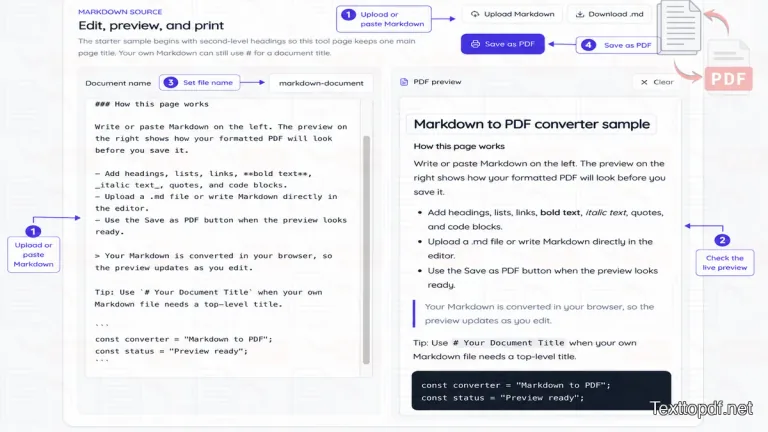
These things matter because the preview is the part you should trust before export. Your raw Markdown stays on one side, and the formatted document view stays on the other side, so you can quickly notice whether the headings, paragraphs, lists, links, and code blocks look right before you save anything.
What this Markdown to PDF page supports
This tool is built for common Markdown content that people actually use in notes, README files, internal documentation, project writeups, and simple writing drafts. It works well when the content already has a sensible Markdown structure.
You can usually expect good results with content like this:
- Headings and subheadings
- Normal paragraphs with spacing
- Bullet lists and numbered lists
- Links inside the text
- Bold text and italic text
- Block quotes
- Inline code and code blocks
That makes the page useful for many everyday Markdown files without turning it into a full publishing tool.
Where this tool is useful
A Markdown file is very useful, especially when you are writing, but a PDF becomes more useful when the work needs to leave the editor. You may want a document copy for project notes, meeting summaries, README handoff, class notes, simple documentation, or a draft that should be easier to open on another device.
This is also helpful when the person who is reading the file does not want the raw Markdown version. A PDF is easier to view or print, and fast to store when the job is no longer being edited.
Private browser-based Markdown conversion
This page works directly in your browser. Your Markdown is rendered in the browser, and the final PDF is created through the browser print step. That means the tool is designed for quick preview and export without sending your normal Markdown writing flow through a heavier document pipeline.
For many users, that is exactly what makes the page useful. You can test the layout, review the structure, and save the document from the same screen without dealing with extra software just to create a shareable copy.
What to check before saving the PDF
The preview is the most useful part of this page, because it shows you what the final document is likely to look like before you save it. A quick check at this stage can save time later, especially when the Markdown file has headings, lists, links, or code that looked fine in raw form but needs a better document layout.
You should look at the heading order first and then check paragraph spacing. After that, make sure lists still look separated, links are readable, and code blocks do not look too wide for the page. These are the small things that usually affect readability once the file is saved.
Common problems you may notice
Sometimes the preview looks a little different from what you expected, and that usually comes from the Markdown itself or from the print settings used at the final step. The page can only render what is written in the file, so an uneven structure inside the Markdown shows up more clearly in the preview.
You may notice issues like these:
- Headings look too close to the next paragraph
- The list items do not look evenly spaced
- Code blocks run too wide on the page
- Browser print margins make the page look too tight
When that happens, the fix usually starts with the content or the print window. A small edit in the Markdown, a better heading break, or a different print margin can improve the result without much effort.
What this tool does not do
This page is meant to help you turn normal Markdown into a readable PDF preview and then save it through the browser print step. It is not a full Markdown editor, and it does not rebuild messy writing into a polished document on its own.
That is important to understand before export. If the Markdown has uneven structure, extra spacing, or awkward code block layout, the preview will reflect that. The tool helps you review the output before saving, but it does not replace the editing work that should happen in the content itself.
Frequently asked questions
Is the Markdown to PDF converter free
Yes. You can paste Markdown, preview the formatted result, and save the document as a PDF through your browser print dialog without paying to use the page.
Does this tool upload my Markdown file
No. The Markdown content is read in your browser, and the final document is saved through the browser print step.
Which file types work on this page
This page is meant for common Markdown file types such as .md, .markdown, and simple .txt files that contain Markdown style writing.
What Markdown features are supported
The preview works well with common Markdown elements such as headings, paragraphs, lists, links, bold text, italic text, block quotes, inline code, and code blocks.
How do I save the preview as PDF
After the preview looks right, use the Save as PDF option and choose PDF in your browser print window. That step creates the final document copy.
Why does my preview not look right
That usually happens when the Markdown file has uneven structure, extra spacing, or content that needs a small cleanup before export. The preview helps you spot those issues before you save the PDF.
Can I use this page for README files and documentation
Yes. This page works well for README drafts, project notes, simple documentation, and other Markdown files that need a document version for sharing or printing.
If you are converting digital ebooks or published EPUB documents, use our dedicated EPUB to PDF converter to preserve chapters and book layouts.