


If the PDF only needs content that can be read easily (having simple paragraphs), then the plain text is usually enough. If the source already has headings, list order, spacing, links, or other visible structure that should still show in the PDF, RTF is the better choice, but it is worth checking once before export because some formatting may not stay exactly the same.
This question usually comes up late. The writing is already done, the PDF still needs to be made, and only then does the doubt start. Should this stay as plain text, or should it remain in RTF before export?
The writing can look almost the same in both files, so it is easy to expect the PDF to look almost the same too. In practice, that is where the difference begins.
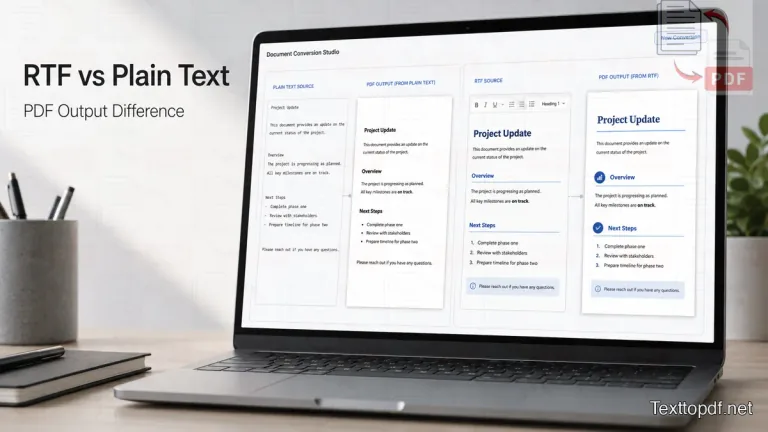
Why can the same writing give two different PDFs?
Take a short note as an example. Save it once as plain text. Save the same note again as RTF with headings, a numbered list, and some spacing between sections.
The words may match, but the second file already has more of the page worked out. That changes the PDF result. One file gives the converter raw writing. The other gives it writing plus part of the document shape.
That is why this topic is not really about file names. It is about what the source file already contains before the PDF is made.
What plain text really gives you
Plain text is useful in very normal situations. A student copies class notes into a simple file. Someone saves a short update from Notepad. A writer cleans up a draft and only wants the writing to stay readable once it is converted into a PDF file.
In cases like these, plain text keeps things simple. The file has the writing, the line breaks, and some basic spacing. It does not already have heading styles, built-in list formatting, or placed images that now need to stay in position.
That simplicity helps. Since there is less structure in the file, there are fewer places where the output can shift during conversion. The PDF may look plain, but it is usually easy to read and easy to trust.
For a basic background on how plain text differs from formatted text, this plain text overview gives a useful starting point.
This is why the regular Text to PDF tool fits well for notes, drafts, letters, logs, and reference text where the aim is to preserve the writing and not a heavily formatted page.
What RTF really gives you
You can use the RTF option when some of your document work has already been done. By the time you open the file, the headings will already be marked, the list may already be in order, the spacing will already look settled, and a link or image may already be part of the page.
The PDF is no longer being built from bare writing alone. It is being built from something that already looks like a document.
That is the value of RTF. It gives the PDF a good starting point. It is also the reason it needs more checking, because more of the page has to stay in place from import to export.
That is where the Rich Text to PDF tool helps. You can open the file in the editor first, see what stayed in place, fix anything that needs attention, and only then download the PDF.
What usually changes in the final PDF
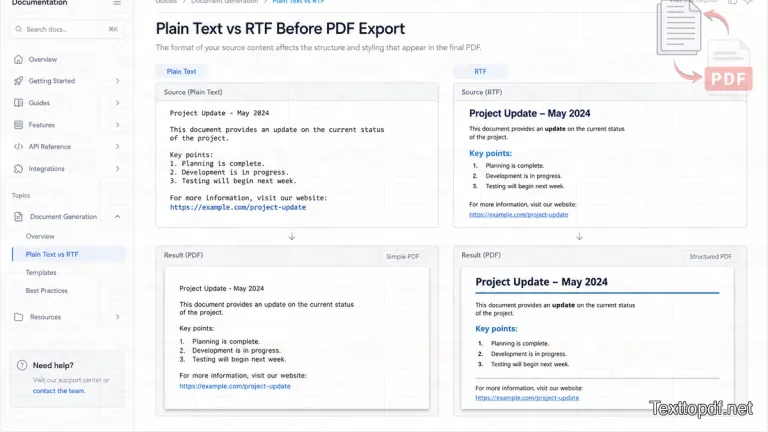
The easiest way to see the difference is to compare what each source file is already giving to the page.
| Source format | What usually shows up in the PDF | What usually stays simpler |
|---|---|---|
| Plain text | words, paragraphs, simple line flow | layout with fewer structure issues |
| RTF | headings, lists, emphasis, links, document shape | a page that can look closer to a finished document |
With plain text, the PDF usually looks simple and direct. In many cases, that is exactly what the document needs.
With RTF, the PDF can keep section headings, numbered points, grouped items, emphasis, links, and spacing that plain text never had in the first place. When those parts hold up well, the result looks much closer to something ready to send.
Why one RTF file works well, and another one creates trouble
This is where many people get stuck. Two files may both end in .rtf, yet the PDF can still turn out quite differently.
A short WordPad note is usually simple, so there is less that can break. A file exported from Word or LibreOffice may already include deeper list rules, table structure, spacing patterns, links, and images. That kind of file needs more care before export.
Mac files can add one more layer of trouble. On the surface, the file still looks simple, but after you have uploaded, the page may not behave the way it is expected, especially if the original document had media or structure that was handled differently in that app.
So the real question is not only whether the file ends in .rtf or not. The important question is what kind of document it is, and which app was used to make it?
When plain text is the better choice
Plain text is a good choice when the document only needs the writing, normal paragraphs, and a stable page after export. In that situation, extra structure does not add much value.
This suits copied notes, rough drafts, short summaries, reference content, logs, and writing that will be arranged inside the editor before the PDF is made. If the file has no headings that need to stay visible and no list order that must be preserved, plain text is usually enough.
A wider explanation of that path already appears in the Text to PDF Guide.
When RTF is the better choice
RTF is a better choice when the file already has a structure that should still show in the final PDF. That includes sectioned notes, reports, handouts, client drafts, internal documents, and writing where hierarchy on the page is part of the message.
In that kind of document, plain text removes too much before export even begins. RTF keeps the headings, list order, spacing, links, and emphasis in the source file, so the PDF begins from a document shape instead of raw writing.
That does not mean every RTF file should go through fast export. If the structure matters, it makes sense to review the import in the editor and preview the PDF before downloading.
Quick decision table
| Situation | Suitable source before PDF |
|---|---|
| Only the writing needs to stay visible | Plain text |
| Headings and list order should still show | RTF |
| Quick export with low structural risk | Plain text |
| The page should look close to a report or handout | RTF |
| Copied notes and raw writing | Plain text |
| Formatted source with visible hierarchy | RTF |
If your file already has a visible structure and you want that structure to remain readable in the final PDF, it also helps to read this guide on RTF to PDF conversion without losing formatting before exporting.
A simple way to decide before conversion
When the choice has to be made quickly, one question usually helps. Does the PDF only need the writing, or does it also need the structure that makes the page easy to read?
If only the writing is important, then the plain text usually does enough. If headings, list order, spacing, links, or images are part of what makes the page usable, RTF gives the PDF a better starting point.
Final note
If the PDF only needs clean writing in a neat layout, plain text is usually enough. If the page needs a visible structure to stay on the screen and on paper, RTF is the better source, but it deserves a quick review before export.