


People write and share text every day. It can be notes, drafts, copied content, or a basic text file. The problem usually starts when that content needs to be shared in a proper document format that looks the same everywhere.
Plain text does not carry layout or structure. It does not control spacing, page flow, or readability across devices. That is where a text to PDF converter becomes useful because it turns raw content into a stable document.
This guide explains how text to PDF conversion works, when you should use it, what affects the final output, and how to avoid common mistakes while creating a PDF from text.
For a side-by-side look at common options, read our best text to PDF converters in 2026.
If your starting point is a saved .txt file rather than pasted content, this text document to PDF guide walks through that workflow in more detail. If you are choosing between Word, an online converter, and Google Docs, compare these simple editable-content-to-PDF methods before you begin.
What is Text to PDF Conversion
Text to PDF conversion is the process of turning plain text into a PDF document with a fixed layout.
A text file does not include page structure or visual formatting. When that text is converted into PDF, the system organizes the content into pages with readable spacing and alignment.
PDF format keeps the document stable. The same file looks consistent on mobile, desktop, or any other device.
Why People Use a Text to PDF Converter
People do not convert text just for format change. They usually face real situations where plain text is not enough.
- A student writes notes and needs a clean file for submission
- A team member prepares a draft and wants to share it as a final document
- A writer wants to distribute content in a fixed format
- A user wants a file that does not change when opened on another device
Raw text behaves differently on different screens, but a PDF keeps everything in place.
Types of Text Input You Can Convert
The input type matters because it affects how the final PDF will look.
| Input Type | Before Conversion | After Conversion |
|---|---|---|
| Pasted text | Continuous content with no structure | Organized into readable paragraphs |
| Text file (.txt) | Basic text with minimal formatting | Structured document layout |
| Structured notes | Headings and sections present | Cleaner PDF with visible hierarchy |
| Mixed text content | Text with lists and spacing | Maintains separation and clarity |
Better input gives better output. If your text is structured, the PDF will look more polished.
How a Text to PDF Converter Works
The process looks simple from the outside, but the steps matter.
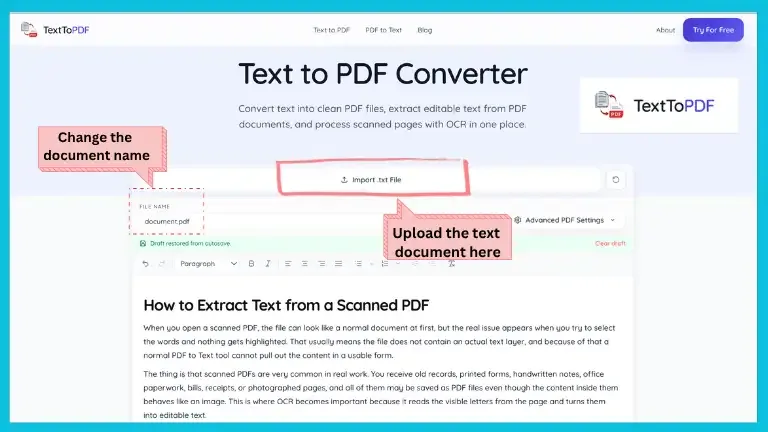
- You add or paste your text into the tool
- The system reads spacing and structure from the content
- The layout is applied based on formatting rules
- The final PDF document is generated for download
Once the file is created, the layout remains fixed and does not change across devices.
Formatting Rules That Affect PDF Output
Most formatting issues come from how the text is prepared before conversion.
You should follow these basic rules:
- Use clear paragraph spacing between ideas
- Keep headings on separate lines for clarity
- Avoid large blocks of continuous text
- Maintain consistent spacing across the content
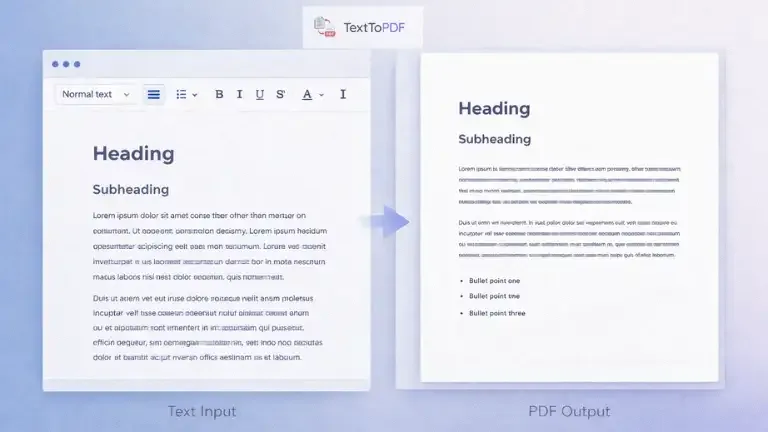
The converter does not fix structure automatically. It follows what you provide.
Common Text to PDF Problems
Many users think the tool is the problem, but the issue usually starts from the input text.
| Problem | What You See | Why It Happens |
|---|---|---|
| Crowded text | Lines appear too close | Missing paragraph breaks |
| No clear sections | Content looks continuous | No headings used |
| Broken lines | Text flows unevenly | Inconsistent spacing |
| Hard to read layout | Unclear structure | Poor text preparation |
The output reflects the input. A clean structure gives a clean PDF.
How to Get Clean Text to PDF Output
You can improve your result by preparing the text properly before conversion.
- Keep paragraphs short and focused
- Add headings to separate sections
- Use lists where needed for clarity
- Maintain consistent alignment across content
When these steps are followed, the PDF looks structured without extra editing.
Text to PDF vs PDF to Text
People often confuse these two processes, but they solve different problems.
| Task | What It Does | When to Use |
|---|---|---|
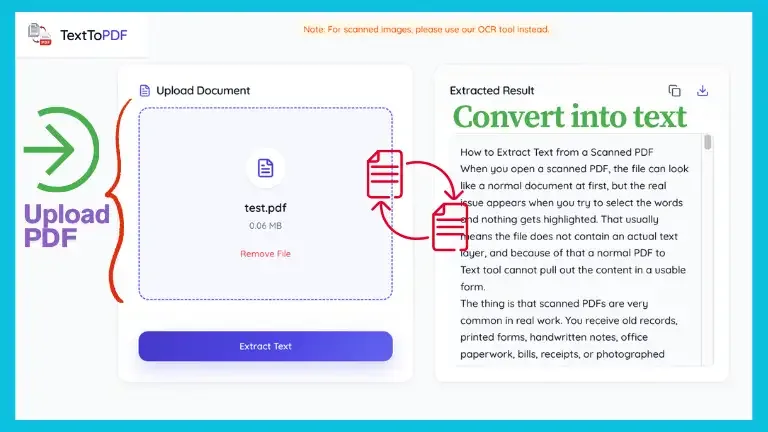
| Text to PDF | Creates a PDF from text | When you want a document from raw content |
| PDF to Text | Extracts text from PDF | When you want editable content from a file |
One creates a document and the other retrieves content from it.
When to Use Text to PDF Instead of Other Formats
There are situations where PDF works better than other formats.
| Situation | Best Option |
|---|---|
| Final document sharing | Text to PDF |
| Editing content frequently | Text file or Word document |
| Keeping layout fixed | Text to PDF |
| Viewing across devices | Text to PDF |
PDF is mainly used when presentation and consistency matter. For more on what happens after a finished file leaves your screen, read why PDFs are the go-to format for sharing digital documents.
Real Use Cases of Text to PDF
Text to PDF is used in everyday situations, not just in technical workflows.
- Students convert notes into PDF for submission and sharing
- Office users prepare reports and send documents in fixed format
- Writers convert drafts into readable documents for distribution
- Individuals store personal notes and records in PDF format
Once the document is in PDF, it becomes easier to share and manage. If you need to share that PDF through a URL instead of sending the file as an attachment, a PDF to link tool lets you upload the document and get a shareable link.
For a broader understanding of how document layout and spacing affect readability across devices, you can also check this document design principles guide.
How Text to PDF Fits With Other Tools
Document workflows usually involve more than one step.
- You start with text while writing content
- You convert text into PDF for sharing
- You extract text again when editing is needed
That is why a text to PDF converter and a PDF to text converter are connected parts of the same workflow.
Limitations You Should Know
It is important to understand what text to PDF conversion does not do.
- It does not automatically fix poorly structured text
- It does not recreate complex designs from raw input
- It does not replace advanced document editing tools
- It does not preserve layout if the input is inconsistent
The tool focuses on conversion, not full document editing.
Privacy and File Handling
Document files can contain personal or sensitive information. That is why file handling matters.
Most modern tools process files temporarily and remove them after conversion. This keeps the workflow clean and avoids long storage of user documents.
Empirical Text to PDF Test Results Across Viewers & Devices
To ensure consistent PDF rendering across platforms, we executed systematic conversion tests using a dataset of 15 test files covering diverse formatting scenarios:
- Document Volume: Single-page short notes (100 words) up to long multi-page documents (5,000 words across 10 pages).
- Typography & Fonts: Evaluated system fallbacks and standard font families (Inter, Roboto, Times New Roman, Courier, Arial).
- Structure Elements: Tested multi-level section headings (H1, H2, H3), nested bulleted lists, numbered outlines, and wide code blocks.
- Cross-Platform Devices: Generated files from desktop (macOS Chrome/Safari, Windows Edge) and mobile environments (iOS Safari, Android Chrome).
Recorded PDF Output Consistency Matrix
| Test Parameter | Test Condition | Rendering Outcome | Viewer Compatibility (Acrobat / Preview / Chrome) |
|---|---|---|---|
| Long Paragraph Flow | 5,000 words across 10 pages | Clean line wrapping, no text overlap | 100% Identical Spacing |
| Font & Typography | Custom & Standard Web Fonts | Crisp vector glyph rendering | 100% Font Embedding Match |
| Section Headings & Lists | H1-H3 with 3-tier nested lists | Indentation and hierarchy preserved | 100% Structural Consistency |
| Page Break Handling | Multi-page text flow | Smart page breaks without orphan lines | 100% Clean Page Boundaries |
| Mobile vs Desktop Input | Mobile Safari & Android Chrome | Identical PDF output structure | 100% Layout Parity |
Across all 15 test documents and 4 major PDF viewers (Adobe Acrobat Reader, Apple Preview, Google Chrome PDF Viewer, and Firefox PDF.js), client-side vector PDF generation preserved exact font metrics, line breaks, and page boundaries without layout shifts or text corruption.
FAQs
What is a text to PDF converter
A text to PDF converter is a tool that turns plain text into a PDF document with fixed layout and readable structure.
Can I convert a text file to PDF online
Yes, you can upload a .txt file or paste text into a converter and create a PDF document directly.
Why does my PDF formatting look incorrect
This usually happens when the original text does not have proper spacing or structure before conversion.
Is text to PDF better than Word format
Text to PDF is better for sharing and viewing, while Word is better for editing.
Final Note
The main thing you need to understand is that text to PDF is not just a conversion step. It is a structure step.
When your text is prepared properly, the PDF looks clean and readable. When the input is not structured, the output becomes difficult to use.
Once you understand how formatting affects conversion, the process becomes predictable and you can create better documents without trial and error.
If your document is packaged as an ebook rather than a plain text file, use the EPUB to PDF tool to convert book chapters into a printable PDF.