


If you send someone a text document, there are always some risks. The fonts can change, or spacing can be disrupted. The formatting may look off to the recipients, even though it looked fine on yours. Then, is there any solid solution to all these issues?
The answer is yes; PDF greatly reduces those formatting risks. It is probably why it has become a popular choice for sharing digital documents.
82% of businesses now use PDF as their preferred file type for external communication, according to a 2025 report. That number alone shows how much this format has become the standard.
In this blog, we'll go through the actual reasons why PDF has become the go-to format for sharing digital documents and why so many businesses and individuals prefer it without a second thought.
If you are deciding which converter fits your document, see our best text to PDF converters in 2026.
What is a PDF?
PDF stands for Portable Document Format. It was developed by Adobe in the early 1990s. The idea behind it was to create a file format that looks exactly the same regardless of the device, software, or operating system it's opened on. So a PDF looks the same every single time, even if it's opened on a phone, a laptop, Windows, Mac, or Linux.
PDF has now developed into much more than just a static file format. It can support things like password protection, digital signatures, fillable forms, and even embedded links.
Benefits of Using PDF for Document Management and Sharing
There are a few real reasons PDF has become the default choice over other formats. Here's a closer look at each one.
1. The Formatting Remains Intact
A text document can look completely different depending on where it's opened. Missing fonts get changed by generic ones. Images and captions are shifted to another page if the page size changes. Line spacing and alignment get distorted. PDFs help avoid this problem. Once a document is converted, the original formatting and layout generally remain the same.
If you have used custom fonts, they will be preserved. The images' position and quality remain intact. This matters a lot for anything that needs to look consistent and professional, a resume, an official document, or a report someone is reviewing for the first time.
2. Opens on Every Device
PDFs work the same on Windows, Mac, Linux, Android, and iPhone. So you don't have to worry about the right software being installed on the receiving end. This is a huge reason why PDF has become so popular for sharing documents.
Most devices these days come with a built-in PDF viewer. You don’t need to download any extra app to open one, either.
3. Documentation Security Support
Word documents and text documents offer little protection. Anyone who can open them is able to edit or copy the content freely. PDF avoids this with robust security features. You can add a password so that only someone who has the right password can open the file.
Also, there are permission settings to control what others can actually do with the file. You can restrict copying, editing, or printing depending on the need. This is a very beneficial feature for contracts, official records, or anything sensitive. Once it leaves your hands, the content is protected from unwanted changes.
4. Provides Better Compression
Files with a lot of content or images can be large and slow the process of uploading or sending via email. Some email services have restrictions for attachment size, so large files may be difficult to send directly. PDF solves this issue efficiently. It supports several compression methods that can help reduce the file size without losing original quality or any piece of content.
That smaller file size makes sharing a whole lot easier. For companies working with large volumes of documents every day, this compression makes a real difference over time.
5. Convenient for Printing and Archiving
The PDF keeps the same layout, so printing is predictable. What you see on screen is what you get on paper. There is no chance of space or page breaks or moving things around unexpectedly.
PDF is also good as an archive, especially when using PDF/A, a version of PDF designed for long-term document preservation. That makes it a good bet for records that need to stay accessible and intact long after initial creation. It can be used for legal, business, or personal recordkeeping purposes.
How to Convert Text to PDF Quickly on the Go?
There are a few different ways to convert text into PDF. Google Docs and MS Word both offer an option to save or download the file as a PDF document. But you need to either download the software (MS Office) or create a Google account to use them.
A quicker, simpler way is using an online text to PDF tool. Just paste your text and get it converted in a few seconds. For a practical demonstration of how these tools actually work, we tested a few options ourselves and found a text-to-PDF tool consistent and accurate. Here's how it works.
- Open the tool in your browser and paste your text directly into the specified box. You can also upload a text file if you already have one saved.
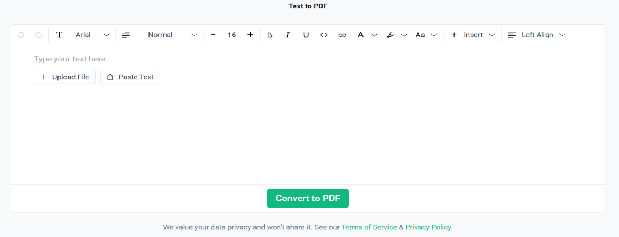
- If needed, adjust basic formatting like font, size, or alignment using the built-in editor.
- Once everything looks right, click the "Convert to PDF" button. The tool will generate your PDF file within seconds and save it to your device automatically.
This whole process takes a few seconds. And this tool works the same way across devices. That is why it is a genuinely quick option whenever text-to-PDF conversion is needed.
Final Words
PDF is the go-to format for a good reason: formatting stays consistent, it opens on any device, it has real security, it compresses well, and it works reliably for printing and long-term archiving. Whenever you need to share a document, it’s always a good idea to convert it to PDF.