
PDF to Text vs OCR: Which Method Should You Use?


Table of ContentsTap to open
You may have seen this in your own work, whether you are a student or a working professional, because you open a PDF file and try to copy some text, yet the result does not look right. Sometimes the words break, sometimes the spacing disappears, and sometimes nothing gets copied at all. At that moment, you start searching for a solution, and you see two common options in front of you: PDF to Text and OCR.
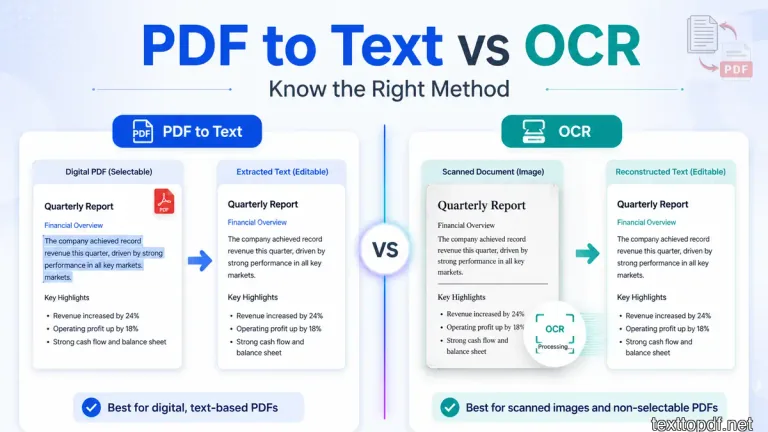
The confusion starts here because both methods promise to extract text from a PDF, but they do not work in the same way. When you use the wrong method, you waste time and still get poor output. That is why you should understand what each method actually does before using it.
This guide explains the difference between PDF to Text and OCR, how each method works, and when you should use one instead of the other.
What Is PDF to Text
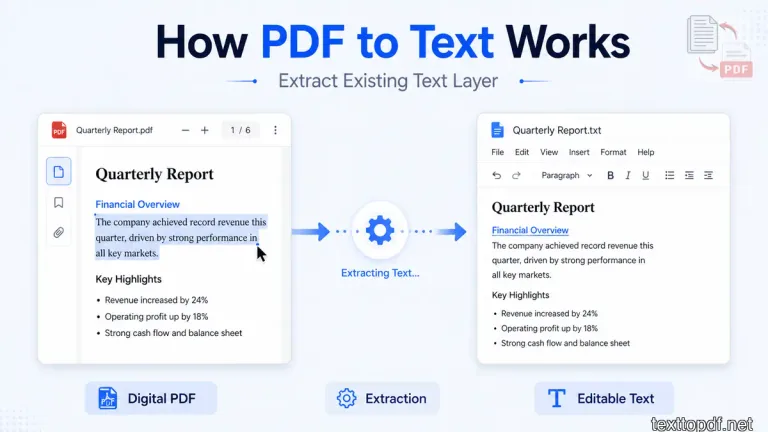
When you use PDF to Text, the system reads the text layer that already exists inside a PDF file and converts it into editable content. This method works only when the file already contains real text.
If a file is created from a document editor or exported digitally, the text already exists inside the file. In that case, the tool simply extracts that text and arranges it into a readable form. Because of this, you usually get faster output and better accuracy.
If you want to understand how this process behaves in detail, you can read this PDF to Text guide, because it explains why extraction works in some files and fails in others.
What Is OCR in PDF
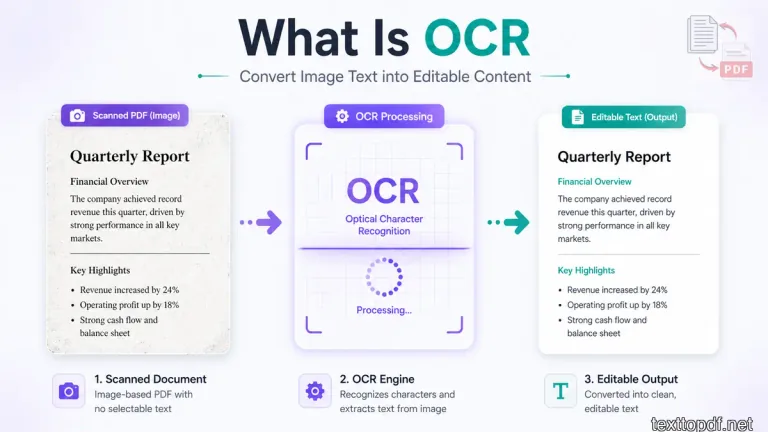
OCR stands for Optical Character Recognition, and you use it when a PDF does not contain real text but only an image of text. In this case, the system cannot extract text directly, so it has to recognize it visually.
When you use OCR, the system scans the image, detects shapes that look like letters, and converts them into actual characters. Because of this extra step, the process takes more time and may also introduce errors.
According to Adobe, OCR technology converts scanned images into searchable and editable text by recognizing character patterns. You can read more in this OCR explanation by Adobe.
PDF to Text vs OCR: Key Differences
You should not treat both methods as the same because they work in completely different ways. The output you get depends on which method you use.
| Feature | PDF to Text | OCR |
|---|---|---|
| Input Type | Digital PDF | Scanned or image PDF |
| Method | Extract existing text | Recognize text from image |
| Accuracy | High if structure is clean | Depends on scan quality |
| Speed | Faster | Slower due to processing |
| Output Quality | Better but may need formatting fixes | May contain recognition errors |
The main thing you need to understand is that the PDF to Text reads existing data, while OCR creates new text from an image.
When You Should Use PDF to Text
You should use PDF to Text when the file contains selectable text. This usually happens when the file is created using Word, Google Docs, or any digital editor.
- You can select and copy text normally
- You are working with a digitally created document
- You want faster output with fewer errors
- You plan to fix formatting after extraction
In these cases, you should use a tool like PDF to Text converter, because the text already exists inside the file and the system can read it directly.
When You Should Use OCR
You should use OCR only when the file behaves like an image. If you try normal extraction in such cases, the output will not be useful.
A good clue is text selection. If the page looks readable but the cursor cannot highlight the words, read this explanation of why text cannot be selected in some PDFs before deciding between OCR and direct extraction.
- You cannot select text inside the file
- The file is scanned or captured using a camera
- You are working with printed or old documents
- The content exists only as an image
If your file matches these conditions, you should follow a scanned workflow. You can read this how to extract text from scanned PDF guide to understand the process clearly.
Why Using the Wrong Method Creates Problems
When you apply the same method to every PDF, problems start appearing. You may not notice the issue at first, but the output will not match your expectations.
If you use PDF to Text on a scanned file, you will not get proper text. On the other hand, if you use OCR on a clean digital file, you may introduce errors that were not present before.
Because of this, you should always match the method with the file type instead of trying random approaches.
Common Problems Users Face
Even when you use the correct method, some issues can still be shown due to file structure or scan quality.
- Sentences break because the file stores text in lines
- Spaces disappear when spacing is not defined clearly
- Characters change when OCR reads shapes incorrectly
- Paragraphs merge when the structure is unclear
You can understand these problems better in this common PDF text issues guide, because it explains why formatting breaks during conversion.
What Happens During PDF to Text Conversion
When you convert a PDF to text, the system does more than just copy content. It reads data, interprets structure, and rebuilds the text into a readable format.
In PDF to Text, the system extracts characters directly from the file. In OCR, the system analyzes visual patterns and converts them into text. Because of this difference, OCR takes more time and may reduce accuracy if the input quality is not good.
Disadvantages of Converting PDF to Text
You should also understand that PDF to Text is not perfect in every situation. Even when the file contains real text, the output may still need manual correction because the system is rebuilding content from a fixed layout.
- Formatting may break because the original layout is not preserved
- Line breaks may appear in the middle of sentences due to page width
- Tables and columns may lose their structure after extraction
- Special fonts or symbols may not convert correctly
Because of these limitations, you should always review the output before using it in another document. If formatting matters for your work, you may need to clean and restructure the extracted text manually.
Real Scenarios Where Each Method Works Better
Now let us look at how this works in real situations, because this is where most users get clarity.
If you are working with notes, reports, or files created from Word or Google Docs, you should use PDF to Text. In these cases, the file already contains a text layer, so the extraction process gives better accuracy and faster results.
If you are working with scanned documents, receipts, printed forms, or old files, you should use OCR. In these cases, the file behaves like an image, so text extraction will not work unless the system recognizes the content visually.
Sometimes you may also see mixed files where some parts are selectable and some parts are not. In that case, you may need both methods, first extract what is available, then apply OCR to the remaining sections.
Performance Comparison: Accuracy, Speed, and Output Quality
You should not expect the same performance from both methods because they follow different processes.
| Factor | PDF to Text | OCR |
|---|---|---|
| Accuracy | Higher when text layer exists | Depends on image clarity |
| Speed | Faster because it reads data directly | Slower due to recognition process |
| Output Cleanliness | Better but may need formatting fixes | May include recognition errors |
| Reliability | Consistent for digital files | Varies based on scan quality |
If your goal is clean and editable text, you should always start with PDF to Text and move to OCR only when required.
Is PDF an OCR
A PDF is not an OCR by itself. It is a file format designed to display content in a fixed layout. OCR is a separate technology that is used only when the file contains image-based text.
If a PDF is created digitally, it already contains text and does not need OCR. If the same PDF is scanned from paper, then OCR becomes necessary to convert the image into text.
Can ChatGPT Do OCR
ChatGPT can help you understand extracted text or improve formatting, but it does not directly perform OCR on files. OCR requires image recognition systems that detect characters from visual input.
You can first use an OCR tool to extract text from a scanned PDF, and then use ChatGPT to clean, rewrite, or organize that text.
What Is the Difference Between OCR and Text Extraction
The difference is simple when you look at how each method works.
PDF to Text reads existing characters from a file. OCR creates characters by analyzing an image. Because of this, PDF to Text is usually more accurate when the text layer exists, while OCR depends on how clear the image is.
PDF to Text vs OCR Online and Free Tools
Many users search for online and free tools for both methods. You should know that most tools follow the same logic, but the quality depends on how they handle structure and recognition.
When you use an online PDF to Text tool, the system extracts text from the file directly. When you use an OCR tool online, the system uploads the file, processes the image, and then returns recognized text.
Free tools can work well for basic tasks, but for complex files with tables, columns, or low-quality scans, you may see limitations in output accuracy.
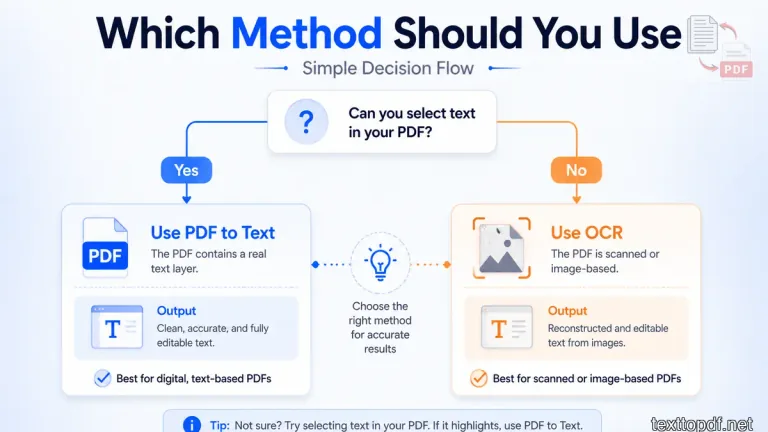
Key Decision Guide You Should Follow
At this stage, you should follow a clear decision flow instead of guessing.
- If text is selectable, use PDF to Text
- If text is not selectable, use OCR
- If output looks messy, clean formatting manually
- If scan quality is low, expect errors in OCR
This simple method helps you avoid confusion and saves time during extraction.
Additional Note on Accuracy and Limitations
You should also know that OCR accuracy depends on multiple factors such as image clarity, font style, lighting, and alignment. According to this OCR overview on Wikipedia, recognition systems work by matching patterns, which is why unclear scans reduce accuracy.
This is also why PDF to Text gives better results for digital files, while OCR becomes necessary for scanned documents, even though it may introduce small errors.
Final Conclusion
Now you understand how PDF to Text and OCR actually work and why both methods exist. The confusion usually comes from treating all PDF files in the same way, even though they behave differently.
When you check the file type first and then choose the correct method, the process becomes much more predictable. You get better output, spend less time fixing errors, and understand exactly what to expect from each step.
This is how you should approach PDF to text extraction in real situations, not by trying random tools, but by following a clear and logical workflow.
About the author
Written by Sourav Kumar Sahu
Content & Product Lead
Sourav Kumar Sahu handles content planning, user research, and product documentation for TextToPDF.net, focusing on PDF conversion, text extraction, OCR workflows, and clean document formatting. TextToPDF.net is maintained by developers and technical specialists with practical experience in PDF conversion, text extraction, OCR workflows, and document formatting.
View LinkedIn profileReviewed by
Sagar Kumar Sahu
Lead Developer & Technical Reviewer
Sagar Kumar Sahu leads tool development, technical review, and product maintenance for TextToPDF.net, ensuring engine stability, Web Worker performance, and technical accuracy.
Reviewer LinkedInNeed to convert a document?
Try our free tools online.